In an age where security and surveillance technology is advancing rapidly, security cameras have become a crucial component in protecting our homes and businesses. This comprehensive guide will explore the different types of security cameras, their features, and how they can be effectively used to safeguard your property.
Understanding Security Cameras
Security cameras, also known as surveillance cameras, are designed to monitor and record activities in various environments. They serve as a deterrent against criminal activities and provide valuable evidence in case of incidents. Modern security cameras come with a range of features that cater to different needs, from simple home monitoring to complex business surveillance systems.
Types of Security Cameras
- Wired vs. Wireless Cameras
- Wired Cameras: These cameras are connected to a recording device via cables. They offer a stable connection and consistent video quality, but installation can be more labor-intensive due to the need for wiring.
- Wireless Cameras: These cameras use Wi-Fi to transmit video footage to a recording device or cloud storage. They are easier to install and can be placed in locations where wiring might be challenging. However, they rely on a stable Wi-Fi connection to function properly.
- Indoor vs. Outdoor Cameras
- Indoor Cameras: Designed for use inside buildings, these cameras often have features tailored to indoor environments, such as motion detection and night vision. They are generally not weather-resistant.
- Outdoor Cameras: Built to withstand various weather conditions, outdoor cameras often come with features like weatherproofing, enhanced night vision, and higher durability.
- Fixed vs. PTZ (Pan-Tilt-Zoom) Cameras
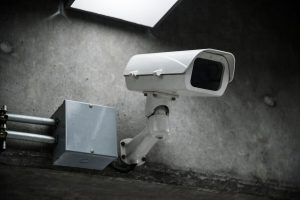
- Fixed Cameras: These cameras have a static lens and are positioned to monitor a specific area. They are ideal for areas where the view does not need to change frequently.
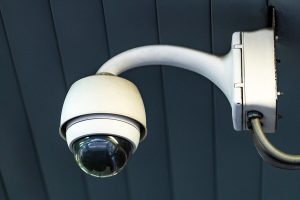
- PTZ Cameras: These cameras can be remotely controlled to pan, tilt, and zoom in on specific areas. They provide a broader field of view and are useful for monitoring large spaces.
- IP Cameras vs. Analog Cameras
- IP Cameras: Internet Protocol (IP) cameras use digital signals and can be connected to a network for remote viewing. They offer high-resolution video and can be integrated with other smart home systems.
- Analog Cameras: These cameras use analog signals and are typically connected to a DVR (Digital Video Recorder). While they are generally less expensive, they offer lower video quality compared to IP cameras.
Key Features to Consider
- Resolution
- The resolution of a camera determines the clarity of the footage. Higher resolution cameras (e.g., 1080p, 4K) provide clearer images and can capture more details.
- Night Vision
- Night vision capabilities allow cameras to record in low-light conditions. Look for cameras with infrared (IR) LEDs or low-light sensors for effective nighttime surveillance.
- Motion Detection
- Motion detection sensors trigger recording when movement is detected. This feature helps in conserving storage space and alerting you to unusual activity.
- Two-Way Audio
- Cameras with two-way audio allow you to listen and speak through the camera, which can be useful for interacting with people on your property or deterring intruders.
- Cloud Storage
- Many modern cameras offer cloud storage options for saving recorded footage. This ensures that your footage is securely stored offsite and can be accessed remotely.
- Mobile App Integration
- Mobile apps provide remote access to your camera system, allowing you to view live footage, receive notifications, and control your cameras from anywhere.
Installation and Placement Tips
- Determine Coverage Area
- Assess the areas you want to monitor and choose camera locations that provide comprehensive coverage. Avoid placing cameras where they might be obstructed or vulnerable to tampering.
- Consider Lighting Conditions
- Ensure that cameras are placed in areas with adequate lighting or have good night vision capabilities. Avoid direct exposure to bright lights that can cause glare and affect image quality.
- Secure the Cameras
- Properly mount and secure cameras to prevent tampering or theft. Use sturdy mounts and ensure that cameras are positioned at appropriate heights.
- Test and Adjust
- After installation, test the cameras to ensure they are capturing the desired areas and adjust their angles if needed. Regularly check for any obstructions or issues.
Maintaining Your Security Camera System
- Regular Updates
- Keep your camera firmware and software updated to ensure they have the latest features and security patches.
- Clean the Cameras
- Periodically clean the camera lenses and housings to maintain clear image quality. Dust and debris can obstruct the view and affect performance.
- Check Connectivity
- For wireless cameras, regularly check the Wi-Fi connection and signal strength to avoid disruptions in footage transmission.
- Review Footage
- Regularly review recorded footage to ensure that the cameras are functioning correctly and that the footage is clear and usable.
Conclusion
Security cameras are an essential tool for enhancing the safety and security of your home or business. By understanding the different types of cameras, their features, and best practices for installation and maintenance, you can make informed decisions and ensure that your surveillance system meets your needs. Investing in the right security camera system not only provides peace of mind but also helps in protecting your property from potential threats.